· Kalpa Madhushan · documentation · 2 min read
Complete Guide: Installing LazyVim on Ubuntu (Step-by-Step)
Learn how to install and configure LazyVim on Ubuntu from scratch, including Neovim, Node.js, Tree-sitter, Git, Kitty terminal, and essential developer tools for a modern Neovim workflow.
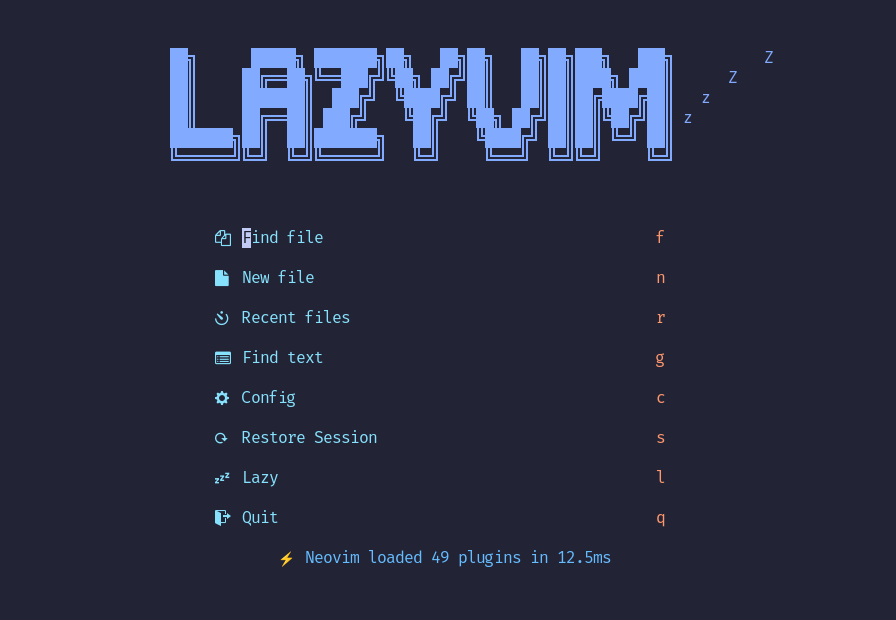
🚀 Complete Guide: Installing LazyVim on Ubuntu (Step-by-Step)
This guide walks you through installing Neovim, LazyVim, and all required tools including Git, Node.js, Tree-sitter, ripgrep, fd, fzf, Kitty terminal, and fonts — everything needed for a smooth modern Neovim setup.
🧩 Requirements Overview
LazyVim depends on:
- Neovim (latest)
- Git
- Node.js (for LSPs & Tree-sitter)
- Tree-sitter CLI
- ripgrep
- fd
- fzf
- Nerd Font (JetBrainsMono recommended)
- Kitty terminal (optional but recommended)
1️⃣ Install Neovim (Latest Version)
Option 1: Prebuilt Binary (Recommended)
curl -LO https://github.com/neovim/neovim/releases/latest/download/nvim-linux-x86_64.tar.gz
sudo rm -rf /opt/nvim-linux-x86_64
sudo tar -C /opt -xzf nvim-linux-x86_64.tar.gz
Add to PATH:
echo 'export PATH="$PATH:/opt/nvim-linux-x86_64/bin"' >> ~/.bashrc
source ~/.bashrc
Verify:
nvim --version2️⃣ Install Git
sudo apt update
sudo apt install -y git
3️⃣ Install Nerd Font (JetBrainsMono)
mkdir -p ~/.fonts
cd ~/.fonts
curl -LO https://github.com/ryanoasis/nerd-fonts/releases/latest/download/JetBrainsMono.zip
unzip JetBrainsMono.zip
fc-cache -fv
👉 Set your terminal font to JetBrainsMono Nerd Font
4️⃣ Install Node.js (Required for Tree-sitter & LSPs)
curl -o- https://raw.githubusercontent.com/nvm-sh/nvm/v0.40.3/install.sh | bash
source ~/.bashrc
nvm install 24
Verify:
node -v
npm -v
5️⃣ Install Tree-sitter CLI
npm install -g tree-sitter-cli6️⃣ Install ripgrep
curl -LO https://github.com/BurntSushi/ripgrep/releases/download/14.1.1/ripgrep_14.1.1-1_amd64.deb
sudo dpkg -i ripgrep_14.1.1-1_amd64.deb
7️⃣ Install fd (fd-find)
sudo apt install -y fd-find
mkdir -p ~/.local/bin
ln -s $(which fdfind) ~/.local/bin/fd
Add to PATH if needed:
echo 'export PATH="$HOME/.local/bin:$PATH"' >> ~/.bashrc
source ~/.bashrc
Verify:
fd --version8️⃣ Install fzf
sudo apt install -y fzf9️⃣ Install Kitty Terminal (Optional but Recommended)
curl -L https://sw.kovidgoyal.net/kitty/installer.sh | sh /dev/stdin
mkdir -p ~/.local/bin
ln -s ~/.local/kitty.app/bin/kitty ~/.local/bin/kitty
ln -s ~/.local/kitty.app/bin/kitten ~/.local/bin/kitten
Verify:
kitty --version🔟 Install LazyVim
Backup existing config (important)
mv ~/.config/nvim{,.bak}
mv ~/.local/share/nvim{,.bak}
mv ~/.local/state/nvim{,.bak}
mv ~/.cache/nvim{,.bak}
Clone LazyVim starter
git clone https://github.com/LazyVim/starter ~/.config/nvim
rm -rf ~/.config/nvim/.git
Launch Neovim
nvimLazyVim will automatically install all plugins.
Run this inside Neovim once:
:LazyHealth✅ One-Command Installer Script (Recommended)
Save this as install-lazyvim.sh and run once.
#!/usr/bin/env bash
set -e

echo "🚀 Installing LazyVim Environment..."

# Base tools
sudo apt update
sudo apt install -y git curl unzip fzf fd-find

# Node + npm
curl -o- https://raw.githubusercontent.com/nvm-sh/nvm/v0.40.3/install.sh | bash
export NVM_DIR="$HOME/.nvm"
source "$NVM_DIR/nvm.sh"
nvm install 24

# Tree-sitter
npm install -g tree-sitter-cli

# Ripgrep
curl -LO https://github.com/BurntSushi/ripgrep/releases/download/14.1.1/ripgrep_14.1.1-1_amd64.deb
sudo dpkg -i ripgrep_14.1.1-1_amd64.deb

# fd
mkdir -p ~/.local/bin
ln -sf $(which fdfind) ~/.local/bin/fd

# Neovim
curl -LO https://github.com/neovim/neovim/releases/latest/download/nvim-linux-x86_64.tar.gz
sudo rm -rf /opt/nvim-linux-x86_64
sudo tar -C /opt -xzf nvim-linux-x86_64.tar.gz
echo 'export PATH="$PATH:/opt/nvim-linux-x86_64/bin"' >> ~/.bashrc

# Kitty
curl -L https://sw.kovidgoyal.net/kitty/installer.sh | sh /dev/stdin
ln -sf ~/.local/kitty.app/bin/kitty ~/.local/bin/kitty

# Nerd Font
mkdir -p ~/.fonts
curl -LO https://github.com/ryanoasis/nerd-fonts/releases/latest/download/JetBrainsMono.zip
unzip -o JetBrainsMono.zip -d ~/.fonts
fc-cache -fv

# LazyVim
mv ~/.config/nvim{,.bak} 2>/dev/null || true
git clone https://github.com/LazyVim/starter ~/.config/nvim
rm -rf ~/.config/nvim/.git

echo "✅ Installation complete! Restart your terminal and run: nvim"
Make it executable and run:
chmod +x install-lazyvim.sh
./install-lazyvim.sh